OBD Scanner ELM327: GaragePro
- 3.2
- Rating
- 1.00M
- Installs
- Free
- Price

 Analysis by App-foxy
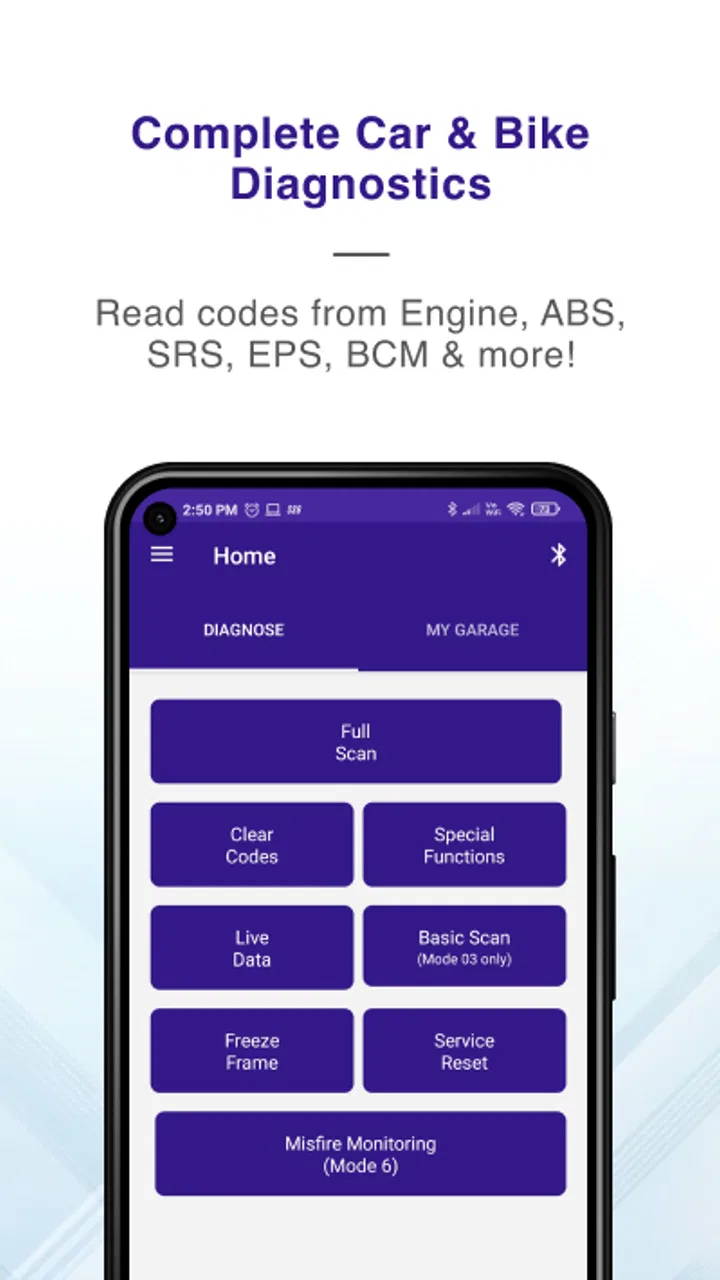
When a warning light appears on the dashboard, the first problem is usually not the repair itself. It is figuring out what the car is trying to say. That is where GaragePro becomes useful. This free Auto & Vehicles app from CaRPM connects the information from a compatible ELM327 OBD scanner with a phone, then gives you a practical way to read and delete diagnostic codes. It also includes coding functions, so it aims to be more than a simple code reader.
I see it as a tool for the gap between “something is wrong” and “I need a mechanic immediately.” It can help a driver understand a dashboard warning, prepare better questions before visiting a garage, or check whether a problem has returned after a repair. It is not a replacement for proper mechanical testing, but it can make the first stage of troubleshooting less mysterious. That distinction matters, because deleting a code is easy; understanding why it appeared is the part that requires care.
From a dashboard warning to a useful diagnosis
The app has been available since July 2016 and has grown to over 1M installs. Its current version is 4.0.5, and it runs on Android 6.0 or later. The overall rating sits at 3.2 from around 6.8K ratings, which tells me the experience is useful for many owners but not consistently effortless. The wide range of vehicles, scanners, phones, and user expectations in this category probably explains some of that unevenness.
You May Also Like

 Blood Strike: 2.5 Anniversary
Blood Strike’s Loadouts Turn Every Drop Into a Tactical Gamble
A close look at Blood Strike’s custom loadouts: how fast access to signature weapons reshapes its battle royale rhythm, rewards preparation, and narrows the gap between fights.

 Pandora - Music & Podcasts
Pandora’s Music Is Easy to Start, but Harder to Recover
Pandora’s strength is its low-effort path from a seed to a station. Its weak spot is how much confidence it asks you to place in connection, setup, and quiet recovery.

 8 Ball Pool
 Is Built on Rivalries, Rematches, and Routine
A close look at the rivalries, rematches, shared routines, and unanswered safety questions that turn a quick pool match into a persistent mobile community.

 Samsung Music
’s Quiet Strength Is Playing What You Already Own
Its reach comes less from spectacle than from dependable access to a personal library. That simplicity is both the app’s strongest retention engine and its ceiling.

 AccuWeather: Weather Radar
AccuWeather Review: A Quick, Clear Forecast for Everyday Decisions
For everyday plans, the best forecast is the one you can understand quickly. AccuWeather makes rain timing, radar, and local conditions easy to act on, with a few trade-offs.

 Hill Climb Racing
Why Hill Climb Racing Still Turns Crashes Into One More Run
A tiny car, a bumpy hill and one more upgrade: Hill Climb Racing keeps resurfacing because its simple chaos makes every near-miss feel personal.
More From Our News Desk



GaragePro is rated for Everyone and is free to install, although in-app purchases range from $4.99 to $299.99 per item. That pricing detail is important for anyone expecting every advanced function to be included at no cost. I would begin with a clear goal rather than installing it simply because a warning light is on: do you want to identify a code, clear a code after a repair, investigate recurring faults, or use a coding function? Your answer affects whether the app is a good fit.
The starting condition is usually simple. A warning appears, the engine feels different, or a used car seller says the vehicle has no serious issues. In each case, the app can provide a useful first handoff from the car’s diagnostic system to your phone. The ELM327 scanner is the bridge. GaragePro does not replace that hardware, so the quality and compatibility of the scanner become part of the experience before the app even opens.
The scanner is the first handoff
Before blaming the app, I would check the physical setup. The scanner needs to be connected to the vehicle’s OBD port, and the phone needs to communicate with it in the expected way. A cheap or unreliable ELM327 device can create symptoms that look like app problems: failed connections, incomplete readings, or a session that drops at the worst moment.
My practical advice is to treat the scanner as a diagnostic instrument, not as a disposable adapter. Make sure it is firmly seated, avoid moving it while the app is communicating, and do not assume that every device sold under the ELM327 name behaves identically. If the connection fails, test the basic link before trying advanced functions. Reinstalling the app will not fix a scanner that cannot maintain communication.
This is also where GaragePro differs from a fully bundled diagnostic product. Some alternatives sell a dedicated adapter and design the software around that exact hardware. GaragePro gives you flexibility because it works with an ELM327 OBD scanner, but that flexibility shifts more responsibility to you. The benefit is that you may already own compatible hardware. The drawback is that troubleshooting becomes a chain with several possible weak points.
Reading the first code without jumping to conclusions
Once the connection is working, the sensible workflow is to read the codes before deleting anything. I would record the displayed code and the circumstances that led to it: whether the light appeared during startup, after refueling, while accelerating, or after another repair. That small note can be more valuable than a screenshot alone, because a code points toward a system or condition, not automatically to one failed part.
The app’s central strength is its ability to read OBD codes and present them in a phone-based workflow. For a driver, that is more approachable than buying a professional scan tool immediately. It can help turn a vague symptom into a conversation starter with a mechanic. Instead of saying “the car feels wrong,” you can explain that a diagnostic code appeared and describe when it happened.
Still, I would not treat the first code as a final verdict. A sensor code may be caused by wiring, a connector, a vacuum issue, low voltage, or another underlying fault. GaragePro can help identify where to investigate, but it cannot make a mechanical inspection unnecessary. This is one of the most important trade-offs: the app improves access to information, while the user still needs judgment.
What to do before pressing delete
The delete function is tempting because a warning light disappearing feels like a result. In my view, clearing should be the last step of a small process, not the first reaction. Save the code, note any symptoms, and decide whether the cause has actually been addressed. If you erase the information too early, you may remove a useful clue before a repair shop sees it.
There is a realistic everyday scenario where this matters. Imagine a check-engine light appears on the way to work, but the car still drives normally. You connect the scanner in a safe place, read the code, and write it down. You then arrange a garage visit and show the technician the code and your description of the symptoms. If the issue is repaired, GaragePro can be used afterward to clear the stored code and check whether the warning returns. That is a sensible handoff from driver to app to mechanic and back to driver.
By contrast, repeatedly clearing a warning without investigating it is a poor workflow. The light may return, the vehicle may continue operating with a real fault, and future diagnosis may become harder. I appreciate that GaragePro makes deletion accessible, but accessibility also means the app should be used with restraint. The best result is not a blank screen; it is a clearer understanding of what has changed.
Coding functions require a more careful handoff
The inclusion of coding functions gives the app a broader purpose than basic OBD reading. Coding can appeal to owners who want to change supported vehicle settings or access functions beyond ordinary fault-code work. However, this is the area where I would be most conservative. Coding is not the same as reading a code, and an interrupted or unsuitable change can create more trouble than a warning light.
I would only use a coding function when I understand exactly what it changes, when the vehicle is supported for that operation, and when the phone-to-scanner connection is stable. I would avoid experimenting on a vehicle that is needed immediately for work or an emergency. A small convenience change is not worth turning a driveable car into a troubleshooting project.
This is also a point where a professional workshop tool may be the better choice. A garage technician can confirm compatibility, maintain a stable setup, and recover from problems with equipment and knowledge that a casual user may not have. GaragePro can be attractive for an informed owner, but the presence of coding functions should not be mistaken for a guarantee that every vehicle or every operation is equally safe for beginners.
Comparing it with the usual alternatives
The usual alternatives fall into three groups. The simplest is a basic code reader, which may be easier to understand but offer fewer functions. The second is a manufacturer-focused or professional scan tool, which can provide deeper vehicle access but usually demands more money, training, or specialized hardware. The third is a garage visit, where the strongest advantage is not just reading a code but interpreting it alongside physical inspection.
GaragePro sits between the first and second options. It is more capable than a bare “read and forget” approach because it combines code handling with coding functions. At the same time, it remains more dependent on the user’s scanner and vehicle compatibility than a dedicated professional setup. I would choose it when I want personal access to diagnostic information and already understand that the result is a starting point, not a repair certificate.
For someone who only wants a quick explanation of a warning light once every few years, a simpler reader may be less frustrating. For a vehicle enthusiast who regularly works on compatible cars and is comfortable checking procedures carefully, GaragePro may offer more useful room to explore. For a safety-critical fault, an intermittent problem, or a vehicle that will not start, I would prioritize a qualified mechanic over any phone app.
Where the workflow can break
The main friction is the number of handoffs. The car must expose the diagnostic information correctly. The ELM327 scanner must communicate reliably. The phone must maintain the connection. GaragePro must support the required operation. Finally, the user must interpret the result correctly. A failure at any point can lead to an incomplete or misleading experience.
The app’s average rating of 3.2 suggests that expectations should be realistic. Some users may expect a universal solution simply because the store summary mentions ELM327 compatibility. In practice, “works with an ELM327 scanner” does not mean every scanner, vehicle, code, and coding operation will behave in exactly the same way. I would check the intended task before paying for an advanced item or relying on the app for a repair decision.
Another limitation is psychological rather than technical. A readable code can create false confidence. The phone makes the information feel simple, but automotive faults are often systems problems. If the code returns after clearing, that is not necessarily an app failure; it may be the most useful result the car can provide. A returning code tells you that the underlying condition remains and deserves proper diagnosis.
There is also a practical reason not to use the app while driving. Connecting, reading, recording, and clearing codes all require attention, and the scanner may remain plugged in during the session. I would complete the process while parked, with enough time to stop if the connection behaves unexpectedly. For a roadside situation, safety and recovery come before obtaining a perfect reading.
Making the information useful to a mechanic
One of the strongest workflows is to use GaragePro before a garage appointment, not instead of one. I would bring the code, the date and circumstances I noted, any change in vehicle behavior, and a clear statement about whether the code was cleared. That gives the mechanic a better starting point than a warning light alone.
The handoff works in the other direction too. After a repair, the app can help confirm whether the warning returns during normal use. I would not call that a complete post-repair test, but it can be a practical observation step. If the code comes back, the information is worth reporting rather than repeatedly erasing. If the warning stays away, that is encouraging, though it still does not replace the mechanic’s inspection or the vehicle’s normal behavior.
This workflow is especially useful for used-car shopping, but with limits. A buyer could use the app to look for stored diagnostic information and ask more informed questions. However, a clean reading should not be treated as proof that a car is perfect. Codes may have been cleared before the inspection, and a short test drive may not recreate the conditions needed for a fault to appear. GaragePro can add evidence; it cannot eliminate the need for a thorough vehicle check.
Who will get the most from it?
I think the best audience is an owner who wants to understand the first layer of vehicle diagnostics without immediately buying professional equipment. It is also a reasonable choice for someone who already has an ELM327 scanner and wants an app that can read and delete codes while offering coding functions. The free installation lowers the barrier to trying the basic workflow, although the in-app purchase range means advanced use may involve additional spending.
It can also suit a careful DIY user who keeps notes, follows vehicle-specific instructions, and knows when to stop. The app becomes more valuable when paired with disciplined habits: read first, record the result, investigate the cause, and clear only after the repair decision is made. That process turns a phone into a useful diagnostic assistant rather than a button for hiding dashboard warnings.
I would skip it if you want a guaranteed one-tap answer, dislike dealing with adapters, or are uncomfortable researching what a code means. I would also choose a professional service first for braking, steering, airbag, or other safety-related concerns. The app may provide information about a vehicle system, but information alone is not a substitute for a trained inspection.
My practical verdict after following the full path
GaragePro is most convincing when I follow the complete path from symptom to outcome: connect a compatible scanner, read and record the code, investigate the likely cause, involve a mechanic when needed, then clear and monitor the result after the repair. In that role, it can save time and make a garage conversation more precise. Its coding functions add potential value for experienced users, but they also raise the cost of making a careless choice.
The app’s weak point is not the idea; it is the dependency chain around the idea. Scanner quality, vehicle support, connection stability, paid functions, and user interpretation all affect the final result. That is why I would not recommend it as a universal answer for every dashboard problem. I would recommend it as a practical first diagnostic layer for the right owner.
CaRPM has built a tool that can be genuinely helpful when used with patience. The free entry point, broad install base, and straightforward purpose make it worth considering, especially if an ELM327 scanner is already available. Just remember the most useful outcome is not always deleting the warning. The real value is carrying better information from the car to your phone, from your phone to the mechanic, and back into a safer repair decision.
FAQs for OBD Scanner ELM327: GaragePro
01What is OBD Scanner ELM327: GaragePro and how does it work?
OBD Scanner ELM327: GaragePro is an automotive diagnostic app that works with the ELM327 Bluetooth/Wi-Fi adapter to read and clear error codes in your vehicle's system. It connects to your car's OBD-II port, providing insights into engine health, performance metrics, and potential issues, making it an essential tool for both professional mechanics and DIY enthusiasts.
02Is OBD Scanner ELM327: GaragePro compatible with all vehicles?
OBD Scanner ELM327: GaragePro is compatible with most vehicles manufactured after 1996 that have an OBD-II port. However, compatibility might vary based on the car model and the ELM327 adapter used. It's recommended to check your vehicle's specifications and consult the app's compatibility list to ensure optimal performance.
03What features does OBD Scanner ELM327: GaragePro offer?
The app offers features such as reading and clearing diagnostic trouble codes, real-time data monitoring, and detailed engine performance reports. It also provides repair suggestions, emissions readiness checks, and access to a vast database of error code definitions, making it a comprehensive tool for vehicle diagnostics and maintenance.
04Are there any subscription fees for using OBD Scanner ELM327: GaragePro?
OBD Scanner ELM327: GaragePro offers both free and premium versions. The free version includes basic diagnostic features, while the premium version unlocks advanced diagnostics, detailed reports, and additional tools. Subscription fees for the premium version vary, so it's best to check within the app for the latest pricing and package details.
05Can I use OBD Scanner ELM327: GaragePro if I'm not a mechanic?
Absolutely! OBD Scanner ELM327: GaragePro is designed to be user-friendly, making it accessible for both professional mechanics and car owners with minimal technical knowledge. The app provides easy-to-understand diagnostics and repair suggestions, empowering users to make informed decisions about their vehicle's maintenance and repairs.
Pros
- User-friendly interface for quick navigation.
- Supports a wide range of car models.
- Provides detailed diagnostics and reports.
- Regular updates enhance functionality.
- Bluetooth connectivity for easy setup.
Cons
- Limited features in the free version.
- Some data may require interpretation skills.
- Occasional connectivity issues reported.
- May not support all vehicle protocols.
- Requires in-app purchases for full access.

OBD Scanner ELM327: GaragePro
Gallery